Prepare imposition and production data
Impose connects data intake, imposition, rule-based print marks, trapping and screening through to plate or cylinder data generation. The workflow is configured for the presses in use.
Imposition software for magazine production
One magazine, several editions, changing plates: connect imposition and production planning with the work at the press console. Impose prepares production; PlateManager supports your team with plate changes and adjustments at short notice in offset printing.
How the tasks connect
Imposition arranges pages on the printing form so they appear in the correct sequence after folding and finishing. Print format, page count and press characteristics determine how the job is prepared.
Multiple versions add another task: which plate assignment is needed when? The production sequence affects how often plates need to be changed on press. Layout and plate change planning should therefore be considered together.
Inside Impose
The layout view shows page positions, orientations and the configured spacing. In Impose, stored press characteristics provide the basis for imposition layouts, rule-based print marks and subsequent data processing.
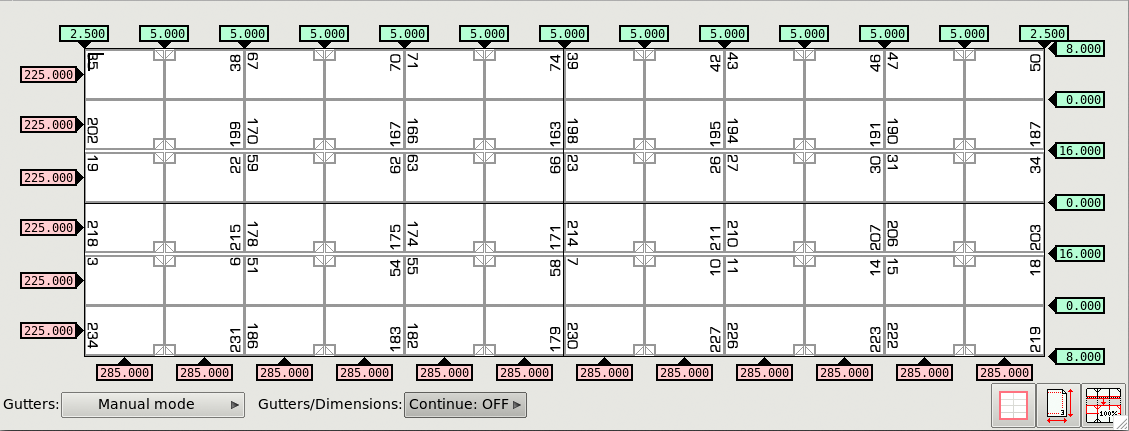
Who does what
Impose handles preparation and automatic optimization. PlateManager makes the resulting change plan available for work at the offset press.
Impose connects data intake, imposition, rule-based print marks, trapping and screening through to plate or cylinder data generation. The workflow is configured for the presses in use.
Automatic sequence optimization takes place in Impose. For your versioned production, we establish which plate assignments, run lengths and operational requirements determine the plan.
If a plate arrives late or another version needs to run first, operators can reorder plate sets in PlateManager. Plate changes and plate counts are recalculated. Individual plates can be reordered by web, form side and color channel.
Page previews support version approval and highlight pages that change from the preceding version. Plate and print status remain visible in the change plan, and the person granting approval is recorded with the approval.

A production scenario
Suppose several editions share common content and differ on individual pages. A required plate is unexpectedly unavailable. This illustrative workflow shows how prepress and the press team can respond.
Pages are assigned to the relevant editions. This provides the basis for preparing imposition layouts and production data for the press.
ImposeImpose optimizes the production sequence. The resulting plate change plan is then available in PlateManager at the press console.
Impose → PlateManagerThe press team brings another version forward and changes the sequence in the browser. PlateManager recalculates the required plate changes for this revised sequence.
PlateManagerThe next version is checked and approved using the page preview. Completed plates and printed versions can be marked in the plan.
PlateManagerSoftware
Impose and PlateManager connect preparation with the press console. We discuss integration based on your existing workflow.
Since 1988
ArtCom was founded by a team of computer scientists at the University of Bremen. Today its solutions are used worldwide in gravure and offset prepress as well as in flexo printing.
Frequently asked questions
It helps arrange pages on the printing form to suit printing and finishing. Impose connects this task with data intake, rule-based print marks, trapping, screening and the generation of plate or cylinder data.
Plate count describes how many printing plates are needed. The number of plate changes describes how often plates are replaced during production. Changing the sequence can affect the number of changes even when the same plates are needed. Both figures should be considered when planning.
Automatic optimization takes place in Impose. PlateManager provides the change plan at the press console and lets operators make adjustments at short notice. After a change, the displayed plate changes and plate count are recalculated.
Impose supports magazine production in both printing processes. Fully automatic processing functions are available for offset production. The plate changes, replacement plate orders and use of PlateManager described here relate to the offset workflow.
A typical job with its page count, versions and run lengths is useful, along with details of your presses and existing data flow. We use this example to establish the imposition layouts, planning requirements and processes for adjustments, replacement plate orders and approvals.
Your production example
Show us a typical magazine job with its versions, run lengths and press assignments. Together we can determine how imposition, production planning and plate changes can work together in your operation.